Wend Game Practice Mode
Practice the linkedin wend game free — unlimited puzzles, three difficulty levels. Play wend online as much as you want, no login, no daily limit.
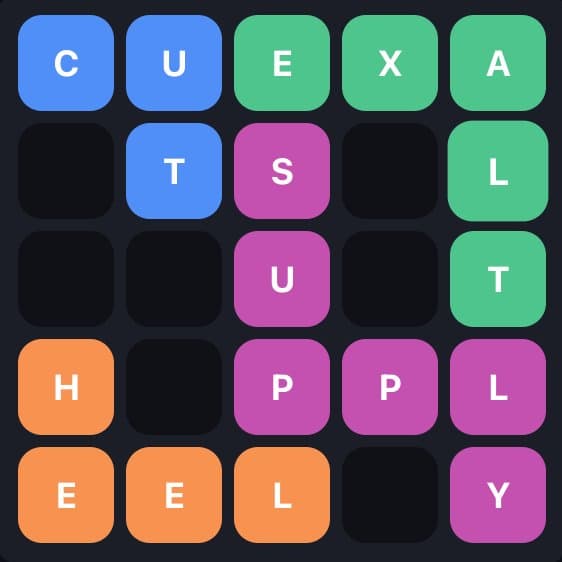
This is what a solved board looks like — practice until it feels natural
Why Practice Wend?
The official LinkedIn Wend puzzle resets once per day — one chance to solve it, and then you wait until tomorrow. If you want to get better at recognizing word shapes, navigating wall layouts, and thinking about the tiling constraint, one puzzle a day is not enough.
Wend game practice here gives you unlimited randomly generated puzzles with the same mechanics as the official game. Each session generates a fresh 5×5 grid with four hidden words of 3, 4, 5, and 6 letters. The walls are placed differently every time, so you are always facing a new spatial challenge.
Regular practice builds pattern recognition — you start to see where the longer word must go based on the wall shapes, which naturally positions the shorter words. Most experienced Wend players find that solving time drops significantly after a few practice sessions. Start on wend easy mode to get comfortable, then progress to Medium and wend hard mode as your skills improve.
Practice Tips to Improve Faster
Start with the 6-letter word
The longest word has the most constrained path — it must fill a specific corridor in the grid. Identifying where the 6-letter word goes first usually unlocks the rest of the puzzle.
Read the walls before reading the letters
Before trying to think of words, trace the open corridors the walls create. Count how many cells each corridor contains. A 3-cell corridor must hold the 3-letter word.
Use Hint strategically in practice
In practice mode, use Hint when you are completely stuck rather than after every move. The goal is to build intuition, not to rely on hints. Try to solve at least half the puzzle before reaching for help.
Use Reset to try alternate solutions
If you solved a puzzle but it felt lucky, hit Reset and try to solve it again from a different starting point. This forces you to understand the puzzle structure rather than memorizing a solution.
Play at least 5 puzzles before the daily
Five practice rounds is usually enough to warm up your spatial thinking before tackling the official LinkedIn Wend daily puzzle.
FAQ
How is practice mode different from the daily puzzle?▾
Practice mode generates unlimited random puzzles so you can play as many as you want. The official LinkedIn daily puzzle has a single unique solution that resets every day. The rules are identical.
Do I need a LinkedIn account to practice?▾
No. Practice mode runs entirely in your browser with no login required. Just open the page and start playing. This is the easiest way to play the linkedin wend game online free.
Is this the best way to practice LinkedIn Wend game online?▾
Yes — WendGames.online offers unlimited wend game online practice with no login. Play wend online free anytime, on any device, with three difficulty levels and instant answers.
Are the practice puzzles the same difficulty as the official game?▾
The mechanics are identical. Difficulty varies naturally since puzzles are randomly generated — some layouts are more straightforward, others are trickier depending on wall placement and word shapes.
How many practice puzzles can I play?▾
Unlimited. Each time you click New Puzzle you get a fresh randomly generated board. There is no daily cap.
Does the Wend practice mode have different difficulty levels?▾
Yes. Use the Easy / Medium / Hard selector above the board. Easy mode uses simpler everyday words, perfect for beginners. Hard mode uses the same word pool as Medium but with more complex wall layouts and path structures. Switch difficulty anytime without losing your streak.
Ready for the real thing? Play the official daily Wend puzzle on LinkedIn.
Play Official Wend on LinkedIn ↗